Your bike inventory
Your parts. One place for everything.
A second wheelset, a spare chain or chain wax: with Velopit you manage fitted components, spare parts and consumables in one place. You know what you have, where it is and what you still need for your next workshop day.
Components Consumables Shopping list Free to use
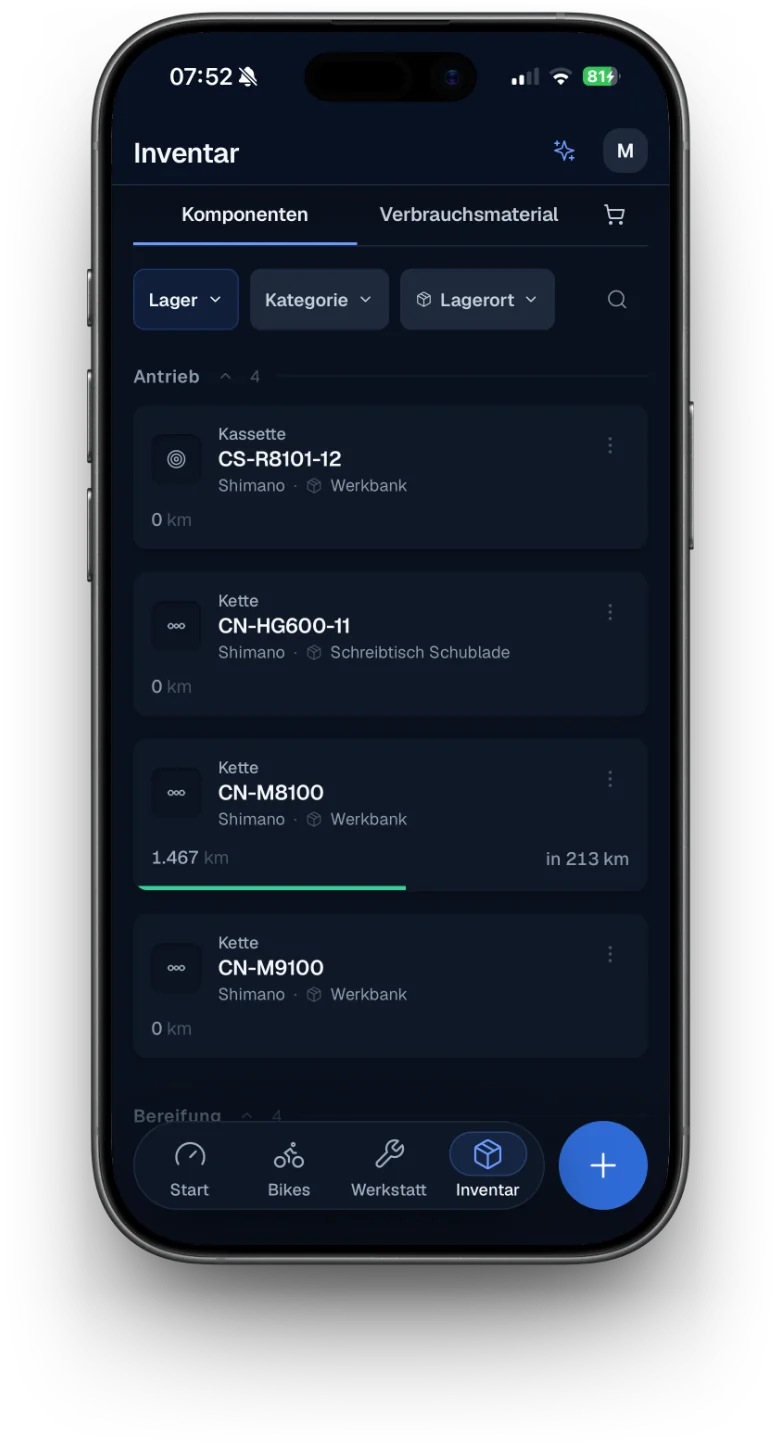
All your kit at a glance
Fitted, in stock or still on the list.
In Velopit, your digital bike record covers more than the parts fitted right now. Spare parts on the shelf, care products and planned purchases have their place too: clearly separated and still linked to each other.
Components
Manage fitted parts, spare components in stock and archived parts. With brand, model, mileage and more details.
Consumables
Keep track of your stock of chain wax, sealant, cleaning products and other care products.
Shopping list
Collect everything you still need for your bikes. After buying, you can move components and consumables straight into your inventory.
More than spare-part stock
Your wheelset changes bikes. Its data stays.
Some components stay with you longer than a single bike. A wheelset moves to another bike, a cassette goes into storage or a saddle is fitted again later. Velopit keeps your components together with their mileage so far and the details you saved.
Fitted or in stock
See which components are fitted to your bikes right now and which parts are ready for their next outing.
Mileage stays with the part
If you fit a used component to another bike, it keeps its mileage so far and its saved service data.
Know where things are
Note where you keep your spare parts, from the workshop cupboard to the box of spares.
For your high-end components too.
Save key details such as the serial number, weight, purchase details, technical specs, notes and documents right on each component.
Small items. Important stock.
Enough sealant left? Or empty again?
You usually need chain wax, tubeless sealant and care products right when you want to work on your bike. With Velopit you see the quantities you have saved and can set the level at which you need to restock.
Quantities at a glance
Manage your consumables in suitable units and see how much is left.
Set a minimum stock level
Decide yourself at what quantity an item is running low. Velopit clearly marks low stock.
Plan it for your workshop day
In your workshop sessions you can get the materials you need ready. When you complete a session, the usage you actually logged is taken off your stock.
Know what is missing
From a missing spare part straight onto the list.
New brake pads for the road bike, sealant for the gravel bike or a spare chain to keep in stock: note what you still want to get. Velopit links your shopping list with your inventory and your workshop planning.
-
Note what you need
Put it on the shopping list.
Add the components or consumables you need, directly or from the relevant part of Velopit.
-
Do the shopping
Everything on one list.
Keep track of your planned purchases and add product details, notes or links when you need to.
-
Update your stock
Bought it? Move it into your inventory.
After buying, you can add new components to your stock or top up the consumables you already have.
Less typing
Upload an invoice. Take a photo. Apply the details.
Adding new components and care products should not mean needless typing. Velopit uses AI to help you add items. You check the details it recognises before they are saved.
Add items from invoices
Upload an invoice or a screenshot of your order. Velopit recognises the components and consumables on it and gets them ready to add to your inventory.
Add components from a photo
Take a photo of a component or a consumable. Velopit can recognise matching product details and fill in the form for you.
For your own build
Parts that belong together stay together.
A wheelset is often more than two wheels. Tyres, cassette and brake rotors may belong to it just as much when you swap it over. With component groups you can bundle parts that belong together and move them as one between bike and inventory.
Component groups are included in Velopit Ride.
FAQ: the bike inventory
What can I manage in the Velopit inventory?
In the Velopit inventory you manage fitted and stored bike components, spare parts, consumables and your shopping list. You can assign components to your bikes, save storage locations and keep key product information.
Can I keep components in stock without a bike?
Yes. You can keep components in your inventory without assigning them to a bike. When you fit them, you can choose the bike. Components you already have keep their saved details and mileage.
Can I move components between my bikes?
Yes. You can remove components, put them in stock and fit them to another bike. Their mileage so far and their saved component data stay with them.
Can I keep track of chain wax and tubeless sealant too?
Yes. Velopit supports consumables with their own stock, units and minimum stock levels. So you can manage chain wax, sealant or bike cleaner, for example, and see when stock is running low.
Can I put missing spare parts on a shopping list?
Yes. You can add components and consumables to the shopping list yourself or take over suggestions from other Velopit features. After buying, you can move items into your inventory or add them to the stock you already have.
Can I import components from an invoice?
Yes. Velopit can read invoices and order screenshots with AI and get the recognised items ready for your inventory. You check the details and decide which items to add.
Can I save documents and serial numbers?
Yes. For components you can save serial numbers, purchase details, technical specs, notes and documents, among other things. That keeps important information linked to each part.
Is the inventory free?
Yes. Components, spare-part stock, consumables and the shopping list are all part of Velopit Basic. You can also add items with AI within your free AI allowance. Component groups are part of the Ride plan.
Everything for your bike. In one place at last.
Organise your components, spare parts and care products in Velopit. So you know what is fitted, what is in stock and what still belongs on your shopping list.
Inventory and shopping list free No credit card needed